AULA
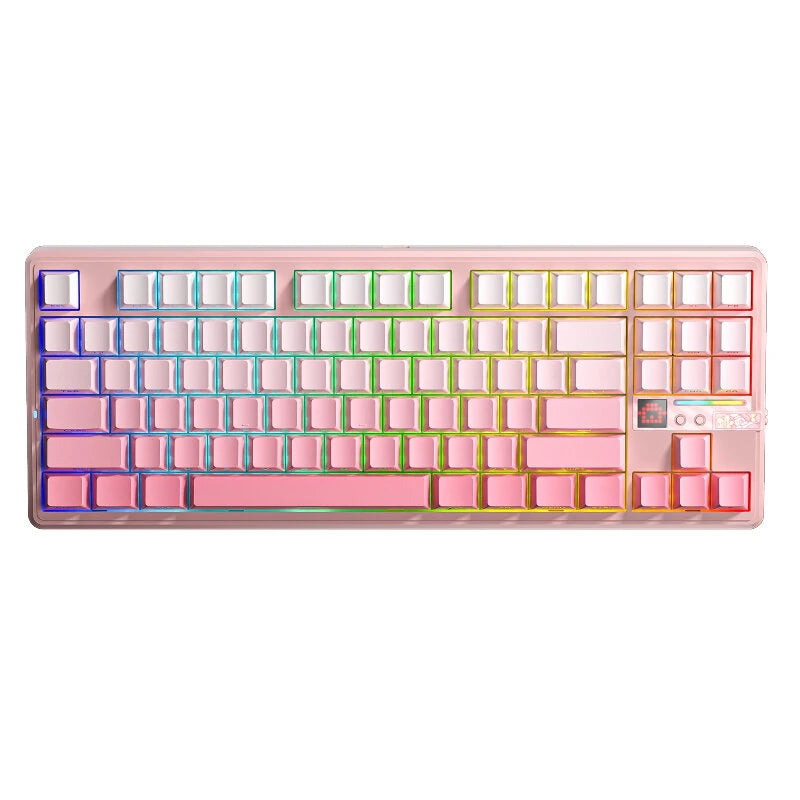
AULA F87 Pro V2 Custom Mechanical Keyboard with LED Matrix Display Gasket Structure Wireless Tri-Mode 80% Layout RGB Hotswap Keys 8K Return 10000mAh Esports Gaming Keyboard
AULA F87 Pro V2 Custom Mechanical Keyboard with LED Matrix Display Gasket Structure Wireless Tri-Mode 80% Layout RGB Hotswap Keys 8K Return 10000mAh Esports Gaming Keyboard
Couldn't load pickup availability
Polling Rate:
White Theme sublimation: 8K (Wired) + 8K (2.4G)
Other Color: 8K (Wired) + 1K (2.4G)
Description:
Brand: AULA
Model: F87 Pro V2
Version: Global version (with CE certification)
Number of keys: 87 keys
Charging interface: USB-C
Connection method: Bluetooth/wired/2.4G wireless
Rated voltage: DC 3.7V (fully charged 4.2V)
Battery capacity: 10000mAh
Feature: -Visual Impact LED Matrix Display -Gasket structure -Fully hot-swappable keys -80% layout -Suitable for gaming, esports, and office use
Package Included:
1 x AULA F87 Pro V2 Mechanical Keyboard
Switch:
Meteor Ice Cream Switch (Linear Switch) Trigger pressure: 42 ± 10gf Total travel: 3.5 ± 0.3mm Trigger stroke: 1.3 ± 0.4mm Full POM material, extended axis, thick sound, HIFI compatible with games and code words
Star Vector Switch (Linear Switch)
Top Housing: PC Stem Material: POM Bottom Housing: PA
Total Travel: 3.5 ± 0.3mm Actuation Force: 40 ± 3gf Initial Force: 32gf Bottom-Out Force: 55 ± 3gf Actuation Travel: 1.8 ± 0.3mm Mechanical Life: about 60,000,000 times
X3 Switch (Linear Switch)
Top Housing: PC Stem Material: PA Bottom Housing: POM
Total Travel: 3.5 ± 0.3mm Actuation Force: 33 ± 3gf Initial Force: 29 ± 10gf
Bottom-Out Force: 45 ± 3gf Actuation Travel: 1.7 ± 0.3mm Mechanical Life: about 60,000,000 times
Strawberry Mint(Linear Switch)
Top Housing: PC Stem Material: PA Bottom Housing: POM
Total Travel: 3.7 ± 0.3mm Actuation Force: 29 ± 3gf Initial Force: 24 ± 10gf
Bottom-Out Force: 38 ± 3gf Actuation Travel: 1.8 ± 0.3mm Mechanical Life: about 60,000,000 times
Notice: 1. Please charge the keyboard before first use. 2.It is recommended to charge the keyboard only via a computer USB port. 3.Do not use fast-charging phone chargers to charge the keyboard. 4.Do not use low-quality or non-standard power adapters to charge the keyboard. 5.Do not use over-voltage or over-current power adapters to charge the keyboard.
Share